


Haltech :cursing: Haltech PS2K won't connect AT ALL :cursing:


Thread Starter

Joined: Dec 2007
Posts: 2,067
Likes: 309
From: St Louis, MO
:cursing: Haltech PS2K won't connect AT ALL :cursing:
Bought a Platinum Sport 2000 from Defined Autoworks in the summer and followed the directions to the letter. All that's wired up is power, ignition switch and ground for the ECU right now so I can put a map on it. Installed the ECU manager software V1.06 and it won't connect. Tried the included V1.07 and it still refuses to work.
Searched and Tried all the stuff that ClaudioRX7 suggested, including the com port crap like changing the bits per second and it's still refusing to connect. Driver REFUSED to update as well, even after 6 times.
Status LED is solid on, never blinks at all.
USB cable is a known good one from my printer, so it's not that
NOT happy with this piece of s**t
Aside from a water pump and hoses, this is the only thing holding up my 20b project from being finished.
Searched and Tried all the stuff that ClaudioRX7 suggested, including the com port crap like changing the bits per second and it's still refusing to connect. Driver REFUSED to update as well, even after 6 times.
Status LED is solid on, never blinks at all.
USB cable is a known good one from my printer, so it's not that
NOT happy with this piece of s**t
Aside from a water pump and hoses, this is the only thing holding up my 20b project from being finished.


Why are you using a USB cable from a printer and not the one that came with the Haltech? Not sure that would be the problem but don't know why you would use one from a printer. Could you give the wires or pins you have setup? There are multiple grounds and power depending on the harness you are using.



Have you contacted Defined? When you purchase a system, you should be purchasing customer support as well. I'm sure they will be able to talk you through what sounds like a PC issue.
Also, you will want to use the USB cable supplied with the system by Haltech once you do get it up and running. Haltech supplies a shielded cable that works much better than a standard cable on a running engine. The EMI is a lot worse in a car with a running engine than the environment your printer is located in.
Also, you will want to use the USB cable supplied with the system by Haltech once you do get it up and running. Haltech supplies a shielded cable that works much better than a standard cable on a running engine. The EMI is a lot worse in a car with a running engine than the environment your printer is located in.
Thread Starter
Joined: Dec 2007
Posts: 2,067
Likes: 309
From: St Louis, MO
Have you contacted Defined? When you purchase a system, you should be purchasing customer support as well. I'm sure they will be able to talk you through what sounds like a PC issue.
Also, you will want to use the USB cable supplied with the system by Haltech once you do get it up and running. Haltech supplies a shielded cable that works much better than a standard cable on a running engine. The EMI is a lot worse in a car with a running engine than the environment your printer is located in.
Also, you will want to use the USB cable supplied with the system by Haltech once you do get it up and running. Haltech supplies a shielded cable that works much better than a standard cable on a running engine. The EMI is a lot worse in a car with a running engine than the environment your printer is located in.
On a positive note, I'll be stopping in at Defined early next week as Logan has offered to take a look at it to see what's buggering up the works.


The cable part looks like this. Clear coating over silver braided shielding. The old cable is all black.
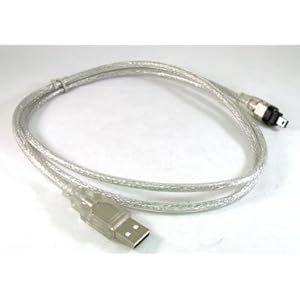
The old cable will work just fine when the engine is not running. However, you can/will have problems when the engine is running trying to use the old cable.
Allen, if you need one of the new ones, let me know.
The old cable will work just fine when the engine is not running. However, you can/will have problems when the engine is running trying to use the old cable.
Allen, if you need one of the new ones, let me know.
Trending Topics
My PS1000 arrived with a severed ground wire in the harness. The symptom was that the fuel pump primed forever and would not turn off after the normal prime time. (because the ECU was never actually on)
If you have a DMM a continuity check on the ECU power and ground wires might be a good idea.
If you have a DMM a continuity check on the ECU power and ground wires might be a good idea.
Thread Starter
Joined: Dec 2007
Posts: 2,067
Likes: 309
From: St Louis, MO
Got an update!!
I talked to Claudio at Haltech today and he said that the USB cable might be the problem. He also confirmed that all you need to boot and connect it to the ECU Manager software is Power and Ground, nothing else.
I'm now using V1.08, which has a host of new features over the older versions. And he let me in on a secret too. V1.09 is now being tested and it'll have some SEXY new features like being able to control the in-development add-on board for more inputs and outputs. And best of all, the add-on board can be daisychained so you can have more than one!!!
My power source, an car cigarette lighter to household outlet adapter (usually for cell phone chargers), was the source of the issues. It's rated for 2 amps and the Haltech itself only draws 300ma, so I thought it wouldn't be an issue.
A $3 multimeter from Harbor Freight solved the problem. As soon as I connected the ignition switch wire, the source voltage dropped to 6.6 volts. But after removing the IGN and INJ relays, it perked back up to 6.88 volts and the haltech instantly connected. The cable I'm using is one from a powered USB hub my mom bought back in 2000 and has a cool late 90s iMac transparent blue color to it so you can see the shielding.
Guess I'll need to invest in a proper indoor 12v supply from now on. So if you're having issues with not being able to connect and the red status LED staying on, CHECK YOUR VOLTAGE
I talked to Claudio at Haltech today and he said that the USB cable might be the problem. He also confirmed that all you need to boot and connect it to the ECU Manager software is Power and Ground, nothing else.
I'm now using V1.08, which has a host of new features over the older versions. And he let me in on a secret too. V1.09 is now being tested and it'll have some SEXY new features like being able to control the in-development add-on board for more inputs and outputs. And best of all, the add-on board can be daisychained so you can have more than one!!!
My power source, an car cigarette lighter to household outlet adapter (usually for cell phone chargers), was the source of the issues. It's rated for 2 amps and the Haltech itself only draws 300ma, so I thought it wouldn't be an issue.
A $3 multimeter from Harbor Freight solved the problem. As soon as I connected the ignition switch wire, the source voltage dropped to 6.6 volts. But after removing the IGN and INJ relays, it perked back up to 6.88 volts and the haltech instantly connected. The cable I'm using is one from a powered USB hub my mom bought back in 2000 and has a cool late 90s iMac transparent blue color to it so you can see the shielding.
Guess I'll need to invest in a proper indoor 12v supply from now on. So if you're having issues with not being able to connect and the red status LED staying on, CHECK YOUR VOLTAGE

