


Photoshop request for logo


Photoshop request for logo
As a follow up to my Mazda logo/font question, is there someone out there who could take the following RX-8 logo and replace the 8 with a 7?
My game plan is turn that logo (in lieu of Mazda written as originally requested) into a decal for my car, so thanks for the help!
My game plan is turn that logo (in lieu of Mazda written as originally requested) into a decal for my car, so thanks for the help!

I wish I knew what it was. 
The only Mazda font I can find is called SF Automation, which is the blocky, old school style that MAZDA is typically written in.
I have no clue what Photoshop is like. Can something be conjured up out of thin air, or do you have to choose a font first?
The only Mazda font I can find is called SF Automation, which is the blocky, old school style that MAZDA is typically written in.
I have no clue what Photoshop is like. Can something be conjured up out of thin air, or do you have to choose a font first?



Trending Topics


I like it, but I think it is too big for the seven. I would like to get it scanned so it could be trasnfered to a vinyl sheet then to a smaller size to what ever color you want.

.

Joined: Jun 2006
Posts: 988
Likes: 1
From: Ky
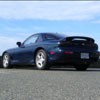
Its not much wider than the stock badges. Just looks bigger because of the style of font used.


Junior Member
Joined: Mar 2007
Posts: 17
Likes: 0
From: Victoria, BC, Canada
Here is the original if you are interested
http://advantia.ca/rx7/rx-7-logo.eps
I did it in Adobe Illustrator and exported it to eps so your sign shop can re-size it at you see fit.
Cheers!
I did it in Adobe Illustrator and exported it to eps so your sign shop can re-size it at you see fit.
Cheers!

reliable performance
Joined: Feb 2001
Posts: 383
Likes: 1
From: MA, USA
Hey, Goomba....the badge on the rear of your car looks great. Outstanding. Much better than stock. But I'm still not clear how you did it. You took an RX-8 badge and a CX-7 badge and put the pieces together, is that it? What's confusing me is the insert picture below the picture of your car. That little picture looks cobbed up. But on the rear of your car everything looks smooth. So how did you do it?


Thread
Thread Starter
Forum
Replies
Last Post