


Power FC PowerFC LCD Tweak.


Thread Starter
Junior Member

Joined: Dec 2013
Posts: 34
Likes: 42
From: Korea
PowerFC LCD Tweak.
here is my PFC LCD tweak story.
in day time, it is too difficult to see commander screen.
so....i change my commander's LCD.
PFC Commander used 128x64 matrix Seiko G1216 LCD.
you can buy compatible LCD on E-bay. search key word 128x64 lcd, g1216....
you have to attention lcd size & pin map. 75mmx52.7mm
PFC's LCD size.
[IMG]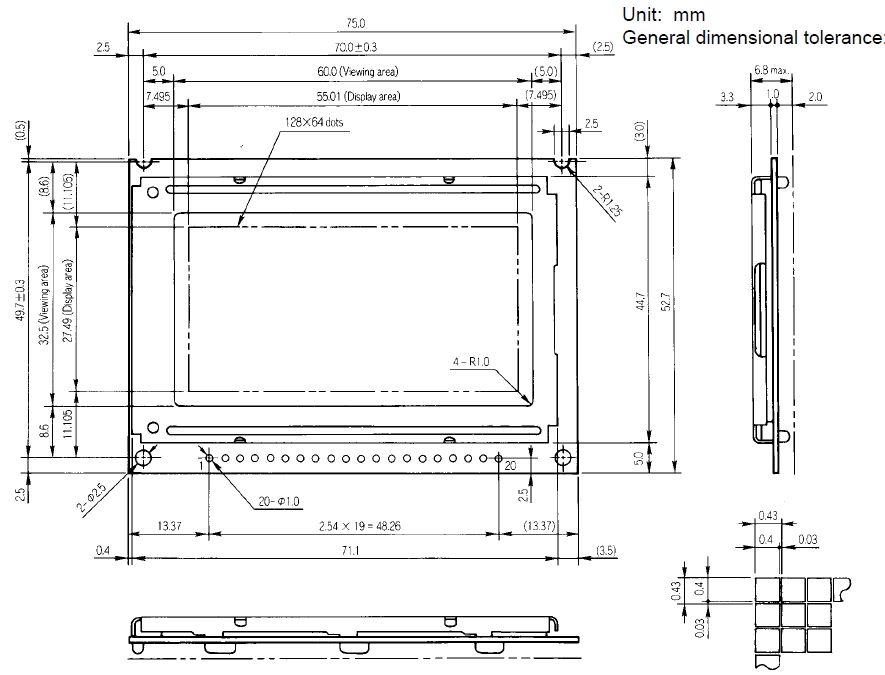 [/IMG]
this is pin map.
[IMG]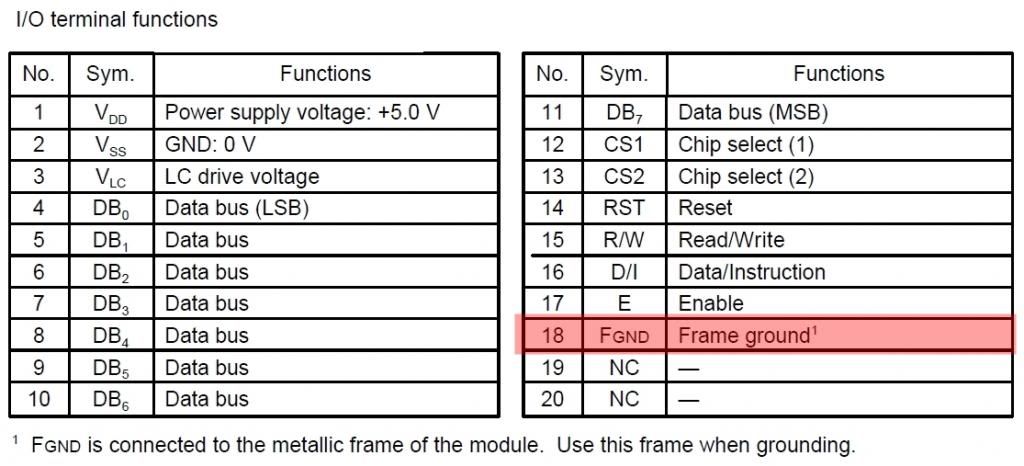 [/IMG]
ok. you purchase compatiable LCD. and let's to change.
this work need some soldering tool....soldering iron, solder sunction tool...etc,
and good soldering skill.( very important ^^)
[IMG]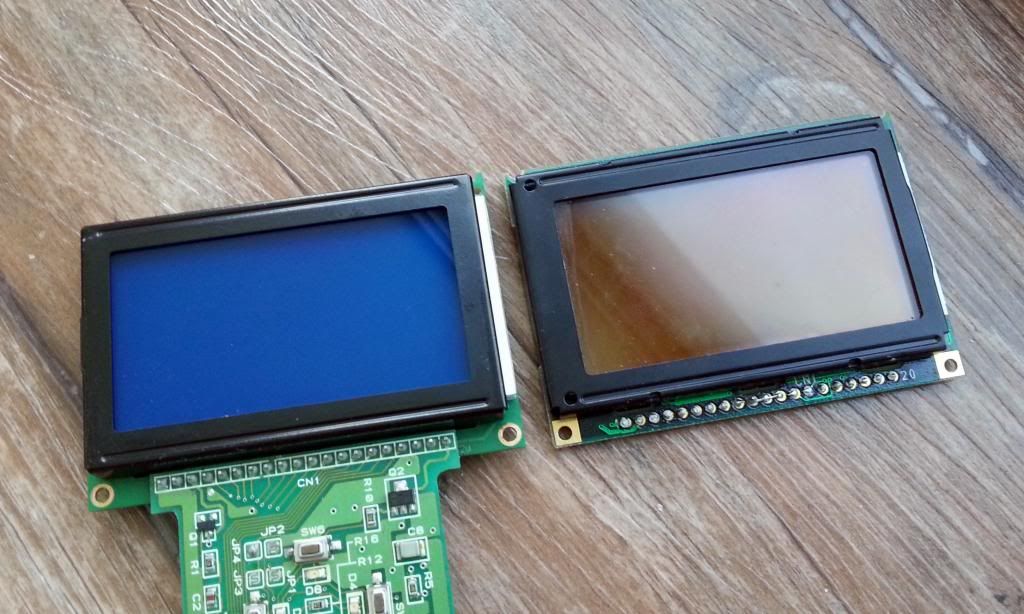 [/IMG]
work complete. new LCD is soldered on to PFC board.
and result is......
[IMG]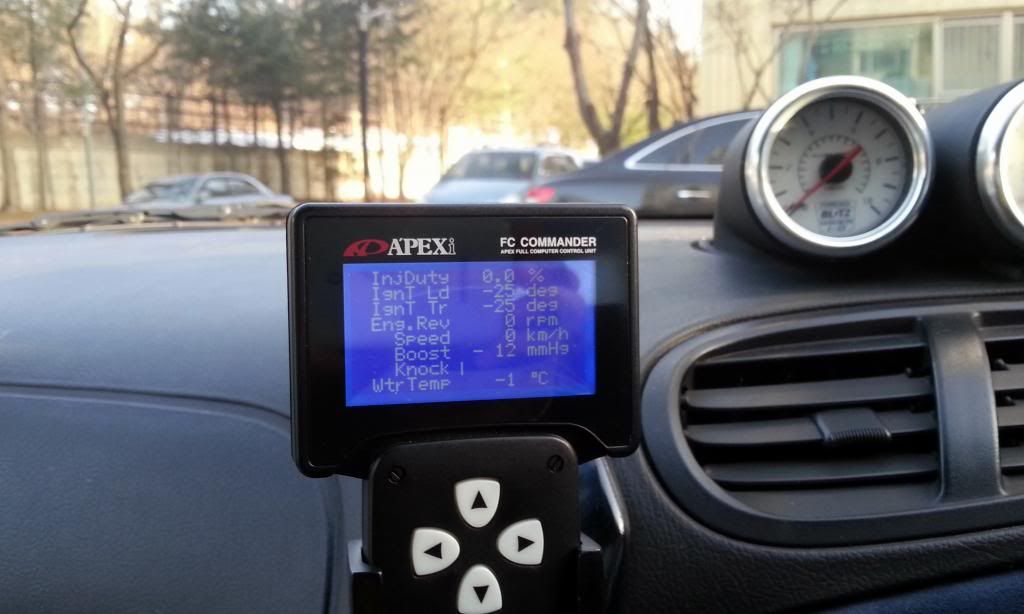 [/IMG]
you can get good legibility~^^
I hope my writing would help PFC user.
in day time, it is too difficult to see commander screen.
so....i change my commander's LCD.
PFC Commander used 128x64 matrix Seiko G1216 LCD.
you can buy compatible LCD on E-bay. search key word 128x64 lcd, g1216....
you have to attention lcd size & pin map. 75mmx52.7mm
PFC's LCD size.
[IMG]
 [/IMG]
this is pin map.
[IMG]
 [/IMG]
ok. you purchase compatiable LCD. and let's to change.
this work need some soldering tool....soldering iron, solder sunction tool...etc,
and good soldering skill.( very important ^^)
[IMG]
 [/IMG]
work complete. new LCD is soldered on to PFC board.
and result is......
[IMG]
 [/IMG]
you can get good legibility~^^
I hope my writing would help PFC user.






Senior Member

Joined: Aug 2013
Posts: 613
Likes: 44
From: Wolnzach Germany
Hi I just tried this with a display from display tech , unfortunately it is not working . I can see the text slightly , but the left half of the screen is on the right and the right half on the left . According to the diagram that came with it it should work . I tried another display from the same manufacturer but same result , can anyone help me ?

Thread Starter
Junior Member
Joined: Dec 2013
Posts: 34
Likes: 42
From: Korea
Check your lcd's pin map. PFC LCD number 18 Pin is gnd. But your lcd is 5v out. I suggest you cut lcd's pattern that Connected to pin 18.
I hope good result.
I hope good result.
Last edited by Jin-74; Jan 14, 2014 at 09:16 AM.
Trending Topics
Senior Member
Joined: Aug 2013
Posts: 613
Likes: 44
From: Wolnzach Germany
Thanks for your reply , but I don't understand . What do you mean by cut LCD pattern ? And what should I connect to pin 18 ? Maybe please share with us your display manufacturer u used .
Thread Starter
Junior Member
Joined: Dec 2013
Posts: 34
Likes: 42
From: Korea
cut lcd's pattern that Connected to pin 18.
because pin 18 connected to Frame Gnd on PFC Main PCB.
and i used "LG128642-BMDWH6V LCD" check below web site and data sheet.
ÀüÀÚºÎÇ°/ÀüÀÚ°ø±¸/°³¹ßº¸µå Àü¹®¼îÇθô - ÅøÆÄÃ÷
i also cut lcd's pattern. and solve the problem.
because pin 18 connected to Frame Gnd on PFC Main PCB.
and i used "LG128642-BMDWH6V LCD" check below web site and data sheet.
ÀüÀÚºÎÇ°/ÀüÀÚ°ø±¸/°³¹ßº¸µå Àü¹®¼îÇθô - ÅøÆÄÃ÷
i also cut lcd's pattern. and solve the problem.


Senior Member
Joined: Aug 2013
Posts: 613
Likes: 44
From: Wolnzach Germany
I am waiting for delivery from germany
( i am in south africa )
I will hopefully be able to confirm next week if this display works but its got a
Neotec NT7108 controller (compatible to KS0108 controller which is used on the original PFC screen)
You must not connect pin 18 ( insulate it or grind it off )
RF-STORE.COM Your RF supplier
Samsung KS0108 is a generic display controller found in certain display modules.
The following controllers are known to be compliant to KS0108:
Samsung S6B0108
Samsung S6B0708
Samsung S6B2108
Samsung KS0708
Hitachi HD61202
Neotec NT7108
AX6108
Last edited by Markus1981; Jan 23, 2014 at 05:58 AM. Reason: added misssing info
Senior Member
Joined: Aug 2013
Posts: 613
Likes: 44
From: Wolnzach Germany
Still waiting for my display to test .
I found two more displays , that should also work
one is black backround with white letters
one is blue backround with white letters
LCD-AG-128064H-BHW W/B-E6
LCD-AG-128064H-DIW W/KK-E6
Will get those end of feb to test .
Has anyone else already tried successful ?
I found two more displays , that should also work
one is black backround with white letters
one is blue backround with white letters
LCD-AG-128064H-BHW W/B-E6
LCD-AG-128064H-DIW W/KK-E6
Will get those end of feb to test .
Has anyone else already tried successful ?

Senior Member
Joined: Aug 2013
Posts: 613
Likes: 44
From: Wolnzach Germany
Tried it tonight with the new screen . Soldere the black and white one in . I could see the pic at an angle , but the background of the screen stayed white instead of black . I think I stuffed up my commander now , tried to unsolder and solder the display again , now it just stays plain white  . Gonna have to look for a new commander now
. Gonna have to look for a new commander now
Thread Starter
Junior Member
Joined: Dec 2013
Posts: 34
Likes: 42
From: Korea
Tried it tonight with the new screen . Soldere the black and white one in . I could see the pic at an angle , but the background of the screen stayed white instead of black . I think I stuffed up my commander now , tried to unsolder and solder the display again , now it just stays plain white . Gonna have to look for a new commander now
. Gonna have to look for a new commander nowAre you adjust Commander's Contrast/Bright Control?
I reduce this value 10/25.
hope this help....
[IMG]
 [/IMG]
Senior Member
Joined: Aug 2013
Posts: 613
Likes: 44
From: Wolnzach Germany

do you guys think this screen would work on the pfc?
http://www.ebay.com/itm/Green-2-4-OLED-Module-128x64-Graphic-Display-for-Oximeter-Arduino-PIC-AVR-ARM-/301226745140?pt=LH_DefaultDomain_0&hash=item4622835d34
http://www.ebay.com/itm/Green-2-4-OLED-Module-128x64-Graphic-Display-for-Oximeter-Arduino-PIC-AVR-ARM-/301226745140?pt=LH_DefaultDomain_0&hash=item4622835d34
Senior Member
Joined: Aug 2013
Posts: 613
Likes: 44
From: Wolnzach Germany
This is the one i ordered it's 11,69 Euro + World wide Delivery 7,02 Euro . I am waiting for delivery from germany ( i am in south africa ) I will hopefully be able to confirm next week if this display works but its got a Neotec NT7108 controller (compatible to KS0108 controller which is used on the original PFC screen) You must not connect pin 18 ( insulate it or grind it off ) RF-STORE.COM Your RF supplier Samsung KS0108 is a generic display controller found in certain display modules. The following controllers are known to be compliant to KS0108: Samsung S6B0108 Samsung S6B0708 Samsung S6B2108 Samsung KS0708 Hitachi HD61202 Neotec NT7108 AX6108



Senior Member

Joined: Oct 2002
Posts: 514
Likes: 1
From: vancouver
having some electronics knowledge, I'm 90% sure that the problem in most of these cases is incorrect voltage at the contrast pin.
50% chance that if you add a variable resistor in series with the contrast pin, you might be able to get the contrast right.
50% chance that if you add a variable resistor in series with the contrast pin, you might be able to get the contrast right.