


Using HKS twin power for a 2 step?


Using HKS twin power for a 2 step?
Since the HKS Twin power hooks up to both the leading and trailing plugs couldn't I get an rpm switch and cut the primary to the Twin Power as a 2 step? using a clutch switch for the RPM switch? or am i missing something..... because i already have a twin power so this would be a cheap and easy way to get a good consistent launch.
Any thoughts?
Any thoughts?



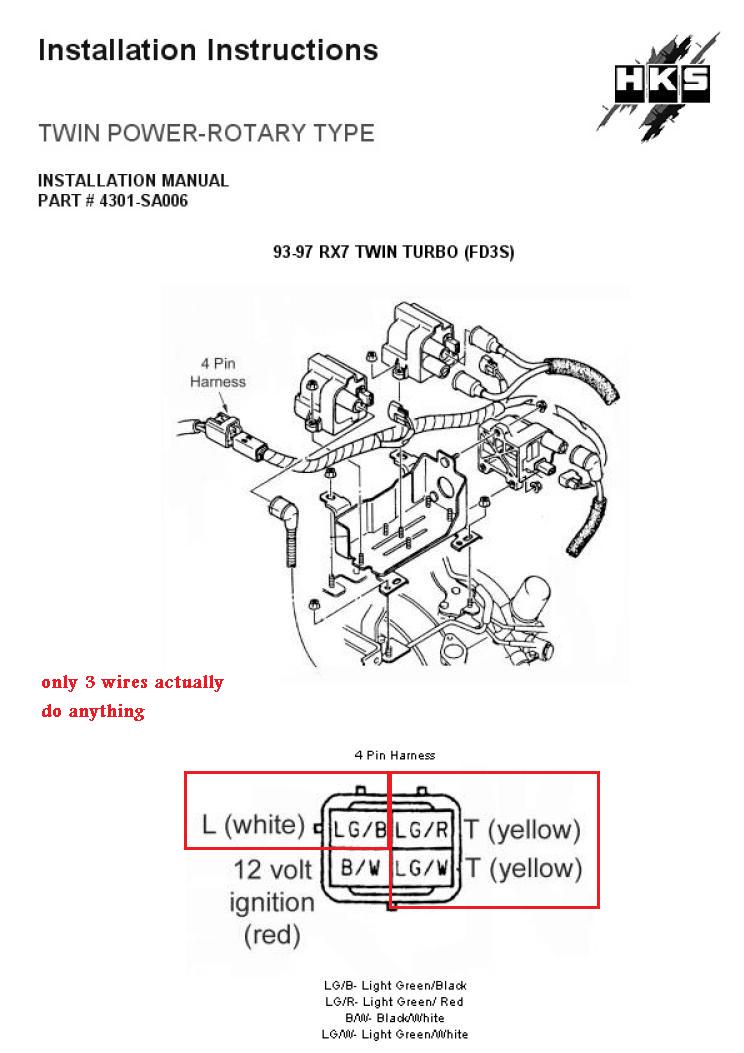
What you have to understand is that the Twin Power is spliced in-line with the coils. It's not like an MSD 6A box where you cut the wires and send one end into the input side and one end into the output. This fact is obscured by the plug-and-play harness available for the FD.
On a FC3S Turbo II, you physically splice wires in-line with the coils and don't cut anything. The red wire is tapped into the leading coil only because it is a convenient ignition-power source.
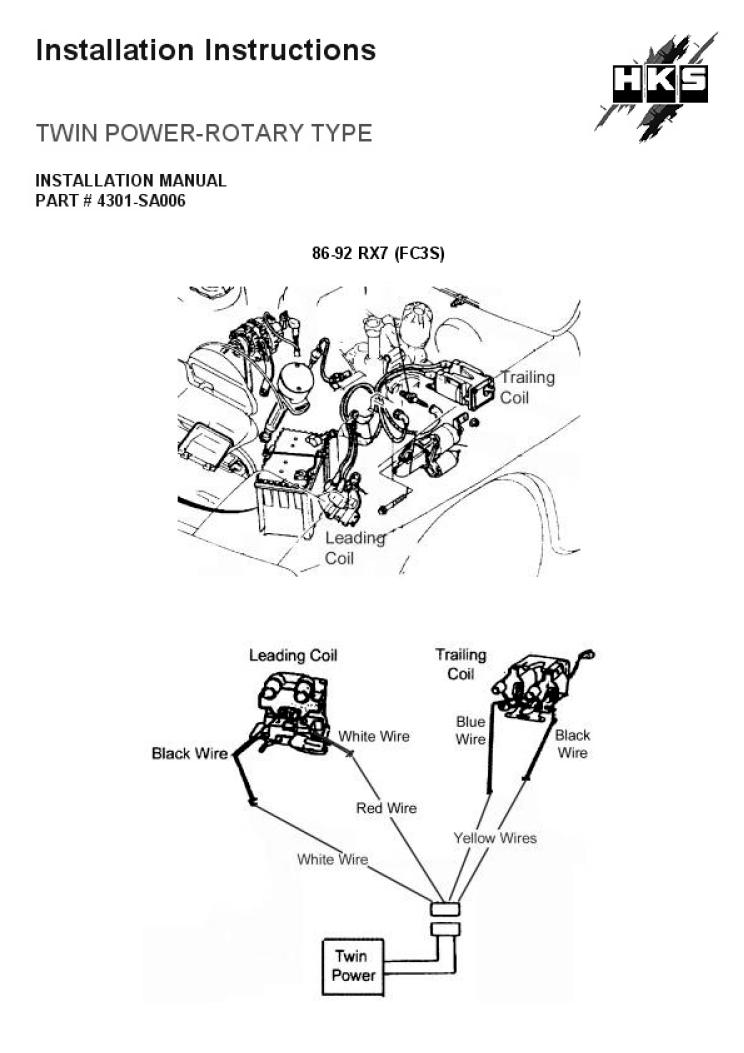
On a FC3S Turbo II, you physically splice wires in-line with the coils and don't cut anything. The red wire is tapped into the leading coil only because it is a convenient ignition-power source.
Okay so correct me if im wrong, it is amplifiying the primary voltage which in turn amplifies the secondary voltage the the spark. So you can still cut the voltage before the Twin Power and it will cut the primary voltage to the coil. Or am i missing something?

Trending Topics
I suspect that if you cut the voltage to the twin power itself the coils will still fire like normal, they just won't be amplified. Give it a shot and see what happens. I would think you have to cut the signal right at the coils themselves.



I found this in the FC Edit Pro manual. This could work as a two step/launch control. I haven't tried it.
E-5-1 Anti lag ☺ (AKA Stutter box, Launch box, Pro start and “Bang bang”) ^
• Spools up your turbo for a quick drag launch
o Assuming you will use the standard clutch switch (+ arming switch)
�� Cut clutch switch wires
�� Connect one wire through an additional (arming) switch from the standard clutch switch to terminal “SW3” on the FC-Box {FC2 FC-Box 4 Switches}
• The additional switch is used to turn anti lag on and off (arm the system). Mount this within easy reach of your driving position
�� Ground the other clutch switch wire
�� Check the enable Anti lag Switch (SW3) “check box” to enable Anti lag
�� Enter the amount of ignition retard you want in the “IGN Anti lag retard” text box
• We found 40 degrees (= 40 degrees of retard) to be quite good but you might want to experiment
Questions? Manual@fc-datalogit.co.nz 71
FC-Datalogit FD3S User Manual
�� Enter the amount of extra fuel you want in the “INJ Anti lag” text box
• We found 1.50 (= add 50% more fuel to base map) to be quite good but you might want to experiment
�� Push the “Update” button on FC-Edit
�� Turn the ignition key off and then back on
�� Arm the system with the additional arming switch
�� When the clutch is depressed the FC-Box will retard the ignition and add fuel to the values you have entered in the appropriate text boxes. RPMs will drop so you need to depress the accelerator to compensate. More boost will be created
�� When the clutch is released the timing and fuel will return to normal
• DANGER! Anti lag has a tendency to foul spark plugs
• Extra heat will be generated in the exhaust manifold which may shorten the life of turbos and the exhaust system
• Anti lag creates A LOT OF NOISE! And flames out the exhaust ☺
E-5
E-5-3 Tuner String 8 characters (read only) ^
• Power Excel Dealer id
Questions? Manual@fc-datalogit.co.nz 72
FC-Datalogit FD3S User Manual
o There is an 8 character string in the Power FC used for tuner details or something. We have used the string to store the FC-Box custom features data. There is a remote chance that a combination of characters used for an Excel dealer id could be the same as the characters we have use to enable the custom features.
�� We suggest you plug in the FC-Box then turn on the ignition (two clicks) and “Read All” before starting the engine. Check that a stray string hasn’t enabled the custom features. If it has, disable it by unchecking the “enabled” check box and “Update”.
�� Set the value of “IGN Anti lag retard” and “INJ Anti lag” to zero until you wish to use the function {E-5-1 Anti lag ☺}
• When you are ready to use the custom features check the enable box
• W-1 “Read all” the settings and maps and save the file!
• Standard Settings
12345678 Tuner string (8 char)
��
Enabled
40
IGN Anti lag retard
��
Boost Switch (SW4)
1.50
INJ Anti lag
��
Anti lag switch (SW3)
E-6 Notes ^
• Notes
o This text box is where you type information you want to save with your settings
�� Just click in the box and type in what you like
• The text will be saved with the other settings and Data
• If you wish to share your settings, you might like to list your mods in “notes text box”
• Questions? Manual@fc-datalogit.co.nz
E-5-1 Anti lag ☺ (AKA Stutter box, Launch box, Pro start and “Bang bang”) ^
• Spools up your turbo for a quick drag launch
o Assuming you will use the standard clutch switch (+ arming switch)
�� Cut clutch switch wires
�� Connect one wire through an additional (arming) switch from the standard clutch switch to terminal “SW3” on the FC-Box {FC2 FC-Box 4 Switches}
• The additional switch is used to turn anti lag on and off (arm the system). Mount this within easy reach of your driving position
�� Ground the other clutch switch wire
�� Check the enable Anti lag Switch (SW3) “check box” to enable Anti lag
�� Enter the amount of ignition retard you want in the “IGN Anti lag retard” text box
• We found 40 degrees (= 40 degrees of retard) to be quite good but you might want to experiment
Questions? Manual@fc-datalogit.co.nz 71
FC-Datalogit FD3S User Manual
�� Enter the amount of extra fuel you want in the “INJ Anti lag” text box
• We found 1.50 (= add 50% more fuel to base map) to be quite good but you might want to experiment
�� Push the “Update” button on FC-Edit
�� Turn the ignition key off and then back on
�� Arm the system with the additional arming switch
�� When the clutch is depressed the FC-Box will retard the ignition and add fuel to the values you have entered in the appropriate text boxes. RPMs will drop so you need to depress the accelerator to compensate. More boost will be created
�� When the clutch is released the timing and fuel will return to normal
• DANGER! Anti lag has a tendency to foul spark plugs
• Extra heat will be generated in the exhaust manifold which may shorten the life of turbos and the exhaust system
• Anti lag creates A LOT OF NOISE! And flames out the exhaust ☺
E-5
E-5-3 Tuner String 8 characters (read only) ^
• Power Excel Dealer id
Questions? Manual@fc-datalogit.co.nz 72
FC-Datalogit FD3S User Manual
o There is an 8 character string in the Power FC used for tuner details or something. We have used the string to store the FC-Box custom features data. There is a remote chance that a combination of characters used for an Excel dealer id could be the same as the characters we have use to enable the custom features.
�� We suggest you plug in the FC-Box then turn on the ignition (two clicks) and “Read All” before starting the engine. Check that a stray string hasn’t enabled the custom features. If it has, disable it by unchecking the “enabled” check box and “Update”.
�� Set the value of “IGN Anti lag retard” and “INJ Anti lag” to zero until you wish to use the function {E-5-1 Anti lag ☺}
• When you are ready to use the custom features check the enable box
• W-1 “Read all” the settings and maps and save the file!
• Standard Settings
12345678 Tuner string (8 char)
��
Enabled
40
IGN Anti lag retard
��
Boost Switch (SW4)
1.50
INJ Anti lag
��
Anti lag switch (SW3)
E-6 Notes ^
• Notes
o This text box is where you type information you want to save with your settings
�� Just click in the box and type in what you like
• The text will be saved with the other settings and Data
• If you wish to share your settings, you might like to list your mods in “notes text box”
• Questions? Manual@fc-datalogit.co.nz

