


Apex'i Power FC won't boost high enough


Thread Starter
Junior Member
Joined: Aug 2016
Posts: 19
Likes: 0
From: Suisse
Apex'i Power FC won't boost high enough
Hi there
I have a problem with my boost values. With the pills and stock solenoid i got 14 PSI boost (Apexi ecu).
Now we have fresh bought the boost control kit from apexi and wired as see below in the picture.
Now the car runs fine, exept the boost won't go over 8 PSI. The boost values in the commander doens't have any affect on the boost value. So I very confused about it, I did thought that apexi can regulate the max boost. Is there somethin I miss?
thanks for your help
I have a problem with my boost values. With the pills and stock solenoid i got 14 PSI boost (Apexi ecu).
Now we have fresh bought the boost control kit from apexi and wired as see below in the picture.
Now the car runs fine, exept the boost won't go over 8 PSI. The boost values in the commander doens't have any affect on the boost value. So I very confused about it, I did thought that apexi can regulate the max boost. Is there somethin I miss?
thanks for your help


Thread Starter
Junior Member
Joined: Aug 2016
Posts: 19
Likes: 0
From: Suisse
Yes I have Datalogit, okay I would try to record a log, is there a special thing to know?

Thread Starter
Junior Member
Joined: Aug 2016
Posts: 19
Likes: 0
From: Suisse
The car has now BNR Stage 3 turbos
Big front mount intercooler
I don't want to go higher than 0.9 Bar because the engine has still the stock 500cc & 850 injectors. But for now we have a problem to control the boost. Its seems the boost control solenoid does nothing.
Big front mount intercooler
I don't want to go higher than 0.9 Bar because the engine has still the stock 500cc & 850 injectors. But for now we have a problem to control the boost. Its seems the boost control solenoid does nothing.
Here is an example of taking a Datalogit log for tuning boost control on sequential twins. This is taken from the data logging procedures we use in the tuning group.
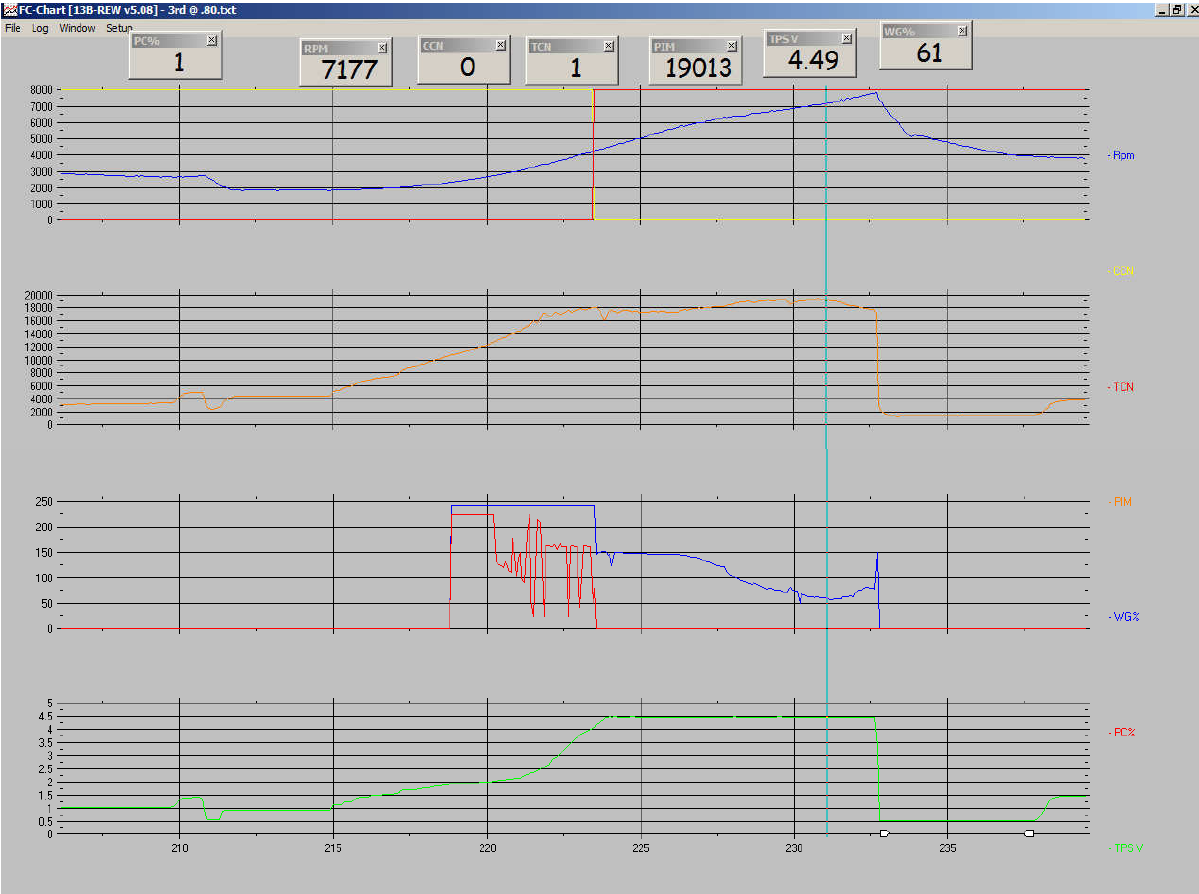
We use 4 charts and 7 traces.
In the monitor window, check the boxes: "Advanced" (which shows solenoid duty) "Sensors/switches" (which shows solenoid state, 0 or 1), and if you have a wideband, "Aux" . Turn off other boxes.
Chart 1 is scaled from 0-8000 rpm. It contains Advanced RPM, Sensor CCN (Charge Control solenoid state), Sensor (TCN) Turbo control solenoid state. This is where we observe the transition between the two turbos. CCN and TCN are RAM flags with a state of 0 or 1. Charge control is closed by default (State: 1) before transition and turbo control is open by default (State: 0) before transition.
The transition point is determined by RPM and throttle position sensor voltage in settings 1 tab, using the turbo transition settings (high during acceleration, low during deceleration).
Chart 2 is scaled from 0-20000. It contains PIM, which are the load coordinates used by the ECU based on the manifold pressure sensor. Units are 10,000=1.0 kg/cm^2 Absolute 20,000 = 2.0 etc
Chart 3 is scaled from 0 to 255. It contains "Advanced PC%" and "Advanced WG%" . This corresponds to the solenoid duty cycle, where 255 = 100% duty and 0 is 0% duty. This is where we monitor the behavior of the boost control system.
This is controlled by the boost set point and the duty set point. PC% Corresponds to the "Primary" setting, and WG% corresponds to the "Secondary" setting for boost control. This is what changes as you adjust boost control settings. Move the boost or duty settings up and down and then observe how this changes.
Chart 4 is scaled from 0 to 5. It is the parameter "Advanced TPS V" which shows the voltage of the full-range TPS. The TPS is used to schedule turbo transition and it helps you understand the throttle position during the log.
We use 4 charts and 7 traces.
In the monitor window, check the boxes: "Advanced" (which shows solenoid duty) "Sensors/switches" (which shows solenoid state, 0 or 1), and if you have a wideband, "Aux" . Turn off other boxes.
Chart 1 is scaled from 0-8000 rpm. It contains Advanced RPM, Sensor CCN (Charge Control solenoid state), Sensor (TCN) Turbo control solenoid state. This is where we observe the transition between the two turbos. CCN and TCN are RAM flags with a state of 0 or 1. Charge control is closed by default (State: 1) before transition and turbo control is open by default (State: 0) before transition.
The transition point is determined by RPM and throttle position sensor voltage in settings 1 tab, using the turbo transition settings (high during acceleration, low during deceleration).
Chart 2 is scaled from 0-20000. It contains PIM, which are the load coordinates used by the ECU based on the manifold pressure sensor. Units are 10,000=1.0 kg/cm^2 Absolute 20,000 = 2.0 etc
Chart 3 is scaled from 0 to 255. It contains "Advanced PC%" and "Advanced WG%" . This corresponds to the solenoid duty cycle, where 255 = 100% duty and 0 is 0% duty. This is where we monitor the behavior of the boost control system.
This is controlled by the boost set point and the duty set point. PC% Corresponds to the "Primary" setting, and WG% corresponds to the "Secondary" setting for boost control. This is what changes as you adjust boost control settings. Move the boost or duty settings up and down and then observe how this changes.
Chart 4 is scaled from 0 to 5. It is the parameter "Advanced TPS V" which shows the voltage of the full-range TPS. The TPS is used to schedule turbo transition and it helps you understand the throttle position during the log.


Trending Topics


Thread Starter
Junior Member
Joined: Aug 2016
Posts: 19
Likes: 0
From: Suisse
Yesterday I did a run but I made also a misstake by making the log file.
I thought the log would record all parameter, but I recorded just mph,dc,boost,ign and the other stuff. Unfortunately it was late so I'm was too tired to made a second run.
I would try tomorrow a new run. It's that correct, I must open addition windows with the PC%, RPM,CCN,PIM,TPS,WG that show me live the data, because it logs just the data that I see live?
thanks
I thought the log would record all parameter, but I recorded just mph,dc,boost,ign and the other stuff. Unfortunately it was late so I'm was too tired to made a second run.
I would try tomorrow a new run. It's that correct, I must open addition windows with the PC%, RPM,CCN,PIM,TPS,WG that show me live the data, because it logs just the data that I see live?
thanks
care to post about your experience here or in your thread https://www.rx7club.com/power-fc-for...osted-1113891/ ? I know you were working through transition and boost control issues.
I have lots of interest and little opportunity to test/tune
 It's something I can only test with a competent co-driver working the laptop
I did up a spreadsheet and will continue posting data as I collect it
Yesterday I did a run but I made also a misstake by making the log file.
I thought the log would record all parameter, but I recorded just mph,dc,boost,ign and the other stuff. Unfortunately it was late so I'm was too tired to made a second run.
I would try tomorrow a new run. It's that correct, I must open addition windows with the PC%, RPM,CCN,PIM,TPS,WG that show me live the data, because it logs just the data that I see live?
thanks
I thought the log would record all parameter, but I recorded just mph,dc,boost,ign and the other stuff. Unfortunately it was late so I'm was too tired to made a second run.
I would try tomorrow a new run. It's that correct, I must open addition windows with the PC%, RPM,CCN,PIM,TPS,WG that show me live the data, because it logs just the data that I see live?
thanks
If you check the "Advanced" and "sensors" box in the monitor window, all those parameters will show up in the .txt data file and live in the monitor window while the engine is running. Or you can add the "Watches" which are the boxes up top to see the parameters. Or you can watch the traces move as the engine runs.
Thread Starter
Junior Member
Joined: Aug 2016
Posts: 19
Likes: 0
From: Suisse
If you check the "Advanced" and "sensors" box in the monitor window, all those parameters will show up in the .txt data file and live in the monitor window while the engine is running. Or you can add the "Watches" which are the boxes up top to see the parameters. Or you can watch the traces move as the engine runs.
So what should I buy now? the complete FC Datalogit kit or just the software( if available)?
Ok I made a fault. I bought the PowerFc cable with the software from Apexi. I thought that Datalogit is the log software from them. But now I see on the www that the datalogit has a own connection box to the powerfc and software.
So what should I buy now? the complete FC Datalogit kit or just the software( if available)?
So what should I buy now? the complete FC Datalogit kit or just the software( if available)?
Thread Starter
Junior Member
Joined: Aug 2016
Posts: 19
Likes: 0
From: Suisse
Little update...
Over a month ago I tried to buy the fc datalogit from their webside. I paid and wait. But nothing happen, I wrote the seller on several emails addresses and again no answer. Get my money back from paypal. But I still need the datalogit, where I can buy one?
The car has a new fail, under WOT above 5000+ RPM has a misfire and pops out of the exhaust like a 2-step rev limiter.
Until I get the datalogit I would like to replace the coils. What for coils are recommend? on rhd there are differnets types and I have no clue which is the right one.
Thanks
Over a month ago I tried to buy the fc datalogit from their webside. I paid and wait. But nothing happen, I wrote the seller on several emails addresses and again no answer. Get my money back from paypal. But I still need the datalogit, where I can buy one?
The car has a new fail, under WOT above 5000+ RPM has a misfire and pops out of the exhaust like a 2-step rev limiter.
Until I get the datalogit I would like to replace the coils. What for coils are recommend? on rhd there are differnets types and I have no clue which is the right one.
Thanks
you need an upgrade. It used to be that you would install an HKS twin power, which basically over drives the stock coils. Now a lot of people are using the SakeBomb Garage kit:
IGN-1A High Performance Ignition System (FD3S RX-7, LHD Mount) - SakeBomb Garage LLC
requires cruise control removal. It replaces the stock coils with individual coals, similar to what is found on General Motors V8 engines.
IGN-1A High Performance Ignition System (FD3S RX-7, LHD Mount) - SakeBomb Garage LLC
requires cruise control removal. It replaces the stock coils with individual coals, similar to what is found on General Motors V8 engines.

Thread
Thread Starter
Forum
Replies
Last Post
AlienHack
3rd Generation Specific (1993-2002)
21
Jun 28, 2017 02:20 PM
cr-rex
3rd Generation Specific (1993-2002)
33
Jun 22, 2017 01:58 PM