


So how did i have a perfectly working Heater yesterday and none today??


Thread Starter
Rotary Enthusiast
iTrader: (18)
Joined: May 2008
Posts: 1,150
Likes: 0
From: Texas BABY!
So how did i have a perfectly working Heater yesterday and none today??
So my heater/AC motor has been working perfect since i got the car. Never had a problem witht he blower motor.
Then today i tried to turn the heater on and the blower won't turn on?
Only thing i had done before is fix my dome light and replace a few fuses that i found were blown in the fues box. I also removed a wire someone had "tapped" into another fuse and ran to one of the empty fuse spots.
So naturally i assumed it was a blown fues, no such luck. I tested them all and they all look to be fine.
Here is what the fuse box looked like bfore i took out the tap and replaced a few fuses that were too big with what the cover said they should be:

Any ideas?
Also, i could not find a fuse that said anything along the lines of blower motor or AC ect, anyone know which fuse it is?
Then today i tried to turn the heater on and the blower won't turn on?
Only thing i had done before is fix my dome light and replace a few fuses that i found were blown in the fues box. I also removed a wire someone had "tapped" into another fuse and ran to one of the empty fuse spots.
So naturally i assumed it was a blown fues, no such luck. I tested them all and they all look to be fine.
Here is what the fuse box looked like bfore i took out the tap and replaced a few fuses that were too big with what the cover said they should be:
Any ideas?
Also, i could not find a fuse that said anything along the lines of blower motor or AC ect, anyone know which fuse it is?

IIRC the blower motor isnt a fuse, its a circuit breaker. Its one of the two black boxes right above the fuses with the red dots. IIRC, push and hold at the dots for a sec or so to reset the breaker
Thread Starter
Rotary Enthusiast
iTrader: (18)
Joined: May 2008
Posts: 1,150
Likes: 0
From: Texas BABY!
Well that makes sense, one of those says heater but i didn't know how to reset it or why it would have blown since i didn't mess with those.
Will try resetting it tomorrow.
Will try resetting it tomorrow.



Trending Topics
Thread Starter
Rotary Enthusiast
iTrader: (18)
Joined: May 2008
Posts: 1,150
Likes: 0
From: Texas BABY!
Didn't feel any click or anything but it works now, that is all that matters,
Whats this, never heard of it?

Thread Starter
Rotary Enthusiast
iTrader: (18)
Joined: May 2008
Posts: 1,150
Likes: 0
From: Texas BABY!
Ok, so i presed that relay and it worked fine for a few days, then i drove my truck for a week. Came back to the RX7 and again today the blower motor won't work again.
So why does this keep popping? i have not messed with any wiring in some time and the blower worked perfect all summer with the AC.
Any ideas?
So why does this keep popping? i have not messed with any wiring in some time and the blower worked perfect all summer with the AC.
Any ideas?
Thread Starter
Rotary Enthusiast
iTrader: (18)
Joined: May 2008
Posts: 1,150
Likes: 0
From: Texas BABY!
Ok, today is another nice day so i am trying to get this working. I am really stumped now.
So i took the relay thing out of the fues box and ohmed it out, seems to be working fine. So i then pulled the power plug on the blower motor, then tested for voltage.
This is where things get strange. Testing for voltage gives me nothing with the fan off (doh) and then when i turn the fan up the voltage slowly climbs to 0.5 volts. Pretty much like it is supposed to only with .5 volts instead of 12.
So i then ohmed the blower motor plug, with the fan off it is real high, about 1000. As i turn the fan up though it comes down, once again just like it is supposed to, until it is about 70 ohms.
BUT voltage is still .5 volts.
So how i am able to hom it out and yet get virtually no voltage?? and why is it not getting any voltage? it was working perfect all summer.
Is there another relay or something that could be the problem here? I really need to get this working today if possible since it is supposed to get cold again and i need the heater and also will not work in the cold.
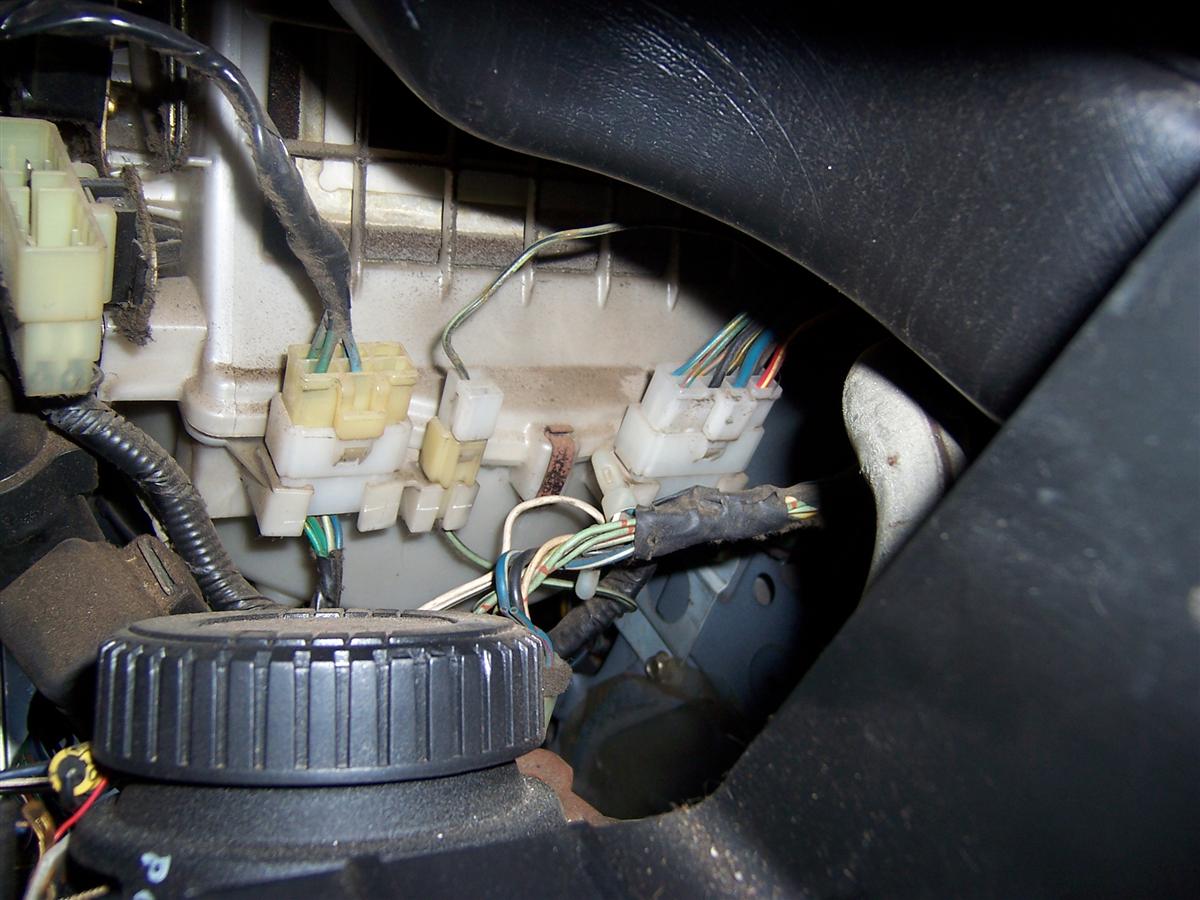
Oh, and here are some connectors that i found by the blower motor that are dissconnected, i have no idea what connects to thm, the car came like this and it worked fine all summer so i assumed that they were just extra options that my car didn't have.

So i took the relay thing out of the fues box and ohmed it out, seems to be working fine. So i then pulled the power plug on the blower motor, then tested for voltage.
This is where things get strange. Testing for voltage gives me nothing with the fan off (doh) and then when i turn the fan up the voltage slowly climbs to 0.5 volts. Pretty much like it is supposed to only with .5 volts instead of 12.
So i then ohmed the blower motor plug, with the fan off it is real high, about 1000. As i turn the fan up though it comes down, once again just like it is supposed to, until it is about 70 ohms.
BUT voltage is still .5 volts.
So how i am able to hom it out and yet get virtually no voltage?? and why is it not getting any voltage? it was working perfect all summer.
Is there another relay or something that could be the problem here? I really need to get this working today if possible since it is supposed to get cold again and i need the heater and also will not work in the cold.
Oh, and here are some connectors that i found by the blower motor that are dissconnected, i have no idea what connects to thm, the car came like this and it worked fine all summer so i assumed that they were just extra options that my car didn't have.
Thread Starter
Rotary Enthusiast
iTrader: (18)
Joined: May 2008
Posts: 1,150
Likes: 0
From: Texas BABY!
Ok, so i looked at the FSM and did all of the tests it says up until testing the back of the AC/Heater controls. So far everythign checks out fine so it must be in the control panel that the problem lies.
Problem is how the heck do you remove that control panel!?!?! Much less back probe the pins to test voltage??
There are some wires on the left side of it that you can't take out and it won't let the panel come out of the dash, it is too short.
So how do you remove it/test it/replace it? without breaking something??
Problem is how the heck do you remove that control panel!?!?! Much less back probe the pins to test voltage??
There are some wires on the left side of it that you can't take out and it won't let the panel come out of the dash, it is too short.
So how do you remove it/test it/replace it? without breaking something??


Joined: Sep 2005
Posts: 25,581
Likes: 136
From: Smiths Falls.(near Ottawa!.Mapquest IT!)
That whole blower motor assembly will Drop out from Below the dash.
Did it and Got the T-Shirt.
there is a Thread on Heater transistor replacement,But I think the guy called it a Resistor on the title..Search away Ace..Dave.
Did it and Got the T-Shirt.
there is a Thread on Heater transistor replacement,But I think the guy called it a Resistor on the title..Search away Ace..Dave.
Joined: Sep 2005
Posts: 25,581
Likes: 136
From: Smiths Falls.(near Ottawa!.Mapquest IT!)
Oh,the logicon(ac/heater Control)?..it has a set of wires that go right up behind the dash,and clip onto the firewall.
Try this: pull the logicoan out and remove the small screws that are holding the Thing together.
You will find that the Wires Feeding the logicon actually clip onto the PC board.If you unclip that,then you can Remove the Logicon from the Center of the dash.
I Think that you "may" be able to get at the Firewall clip through the space above the Logicon(center vent area,) But you have to have real small hands.
I Only noticed the Harness for the Controls,really,when I removed the Dash.(which,If you have to,there is also a thread on that too..writeup on dash removal).
STYX!~
Try this: pull the logicoan out and remove the small screws that are holding the Thing together.
You will find that the Wires Feeding the logicon actually clip onto the PC board.If you unclip that,then you can Remove the Logicon from the Center of the dash.
I Think that you "may" be able to get at the Firewall clip through the space above the Logicon(center vent area,) But you have to have real small hands.
I Only noticed the Harness for the Controls,really,when I removed the Dash.(which,If you have to,there is also a thread on that too..writeup on dash removal).
STYX!~

You can access the hidden logicon harness connector by removing the defroster vent cover at the front of the dash, under the windshield.
The cover is held on with one screw in the center (it may still have the beauty cover hiding it) and several clips on either side...they just pop out.
Having removed the defroster cover panel, you'll see the logicon connector right at the very top of the firewall...probably the worst possible location. I'm guessing that some Mazda engineer still holds a grudge about WW2.
After you unclip the connector- but BEFORE you pull the harness out- do yourself a favor and tie a long string to the connector so it gets pulled through with the harness.
Untie it and leave it in place when the logicon is finally free.
Use the string to fish the connector/harness back through all the crap under the dash when it comes time to reinstall.
This all sounds like a pain but can be done in about ten minutes...
The cover is held on with one screw in the center (it may still have the beauty cover hiding it) and several clips on either side...they just pop out.
Having removed the defroster cover panel, you'll see the logicon connector right at the very top of the firewall...probably the worst possible location. I'm guessing that some Mazda engineer still holds a grudge about WW2.
After you unclip the connector- but BEFORE you pull the harness out- do yourself a favor and tie a long string to the connector so it gets pulled through with the harness.
Untie it and leave it in place when the logicon is finally free.
Use the string to fish the connector/harness back through all the crap under the dash when it comes time to reinstall.
This all sounds like a pain but can be done in about ten minutes...
Thread Starter
Rotary Enthusiast
iTrader: (18)
Joined: May 2008
Posts: 1,150
Likes: 0
From: Texas BABY!
You can access the hidden logicon harness connector by removing the defroster vent cover at the front of the dash, under the windshield.
The cover is held on with one screw in the center (it may still have the beauty cover hiding it) and several clips on either side...they just pop out.
Having removed the defroster cover panel, you'll see the logicon connector right at the very top of the firewall...probably the worst possible location. I'm guessing that some Mazda engineer still holds a grudge about WW2.
After you unclip the connector- but BEFORE you pull the harness out- do yourself a favor and tie a long string to the connector so it gets pulled through with the harness.
Untie it and leave it in place when the logicon is finally free.
Use the string to fish the connector/harness back through all the crap under the dash when it comes time to reinstall.
This all sounds like a pain but can be done in about ten minutes...
The cover is held on with one screw in the center (it may still have the beauty cover hiding it) and several clips on either side...they just pop out.
Having removed the defroster cover panel, you'll see the logicon connector right at the very top of the firewall...probably the worst possible location. I'm guessing that some Mazda engineer still holds a grudge about WW2.
After you unclip the connector- but BEFORE you pull the harness out- do yourself a favor and tie a long string to the connector so it gets pulled through with the harness.
Untie it and leave it in place when the logicon is finally free.
Use the string to fish the connector/harness back through all the crap under the dash when it comes time to reinstall.
This all sounds like a pain but can be done in about ten minutes...
You are right, it is a PAIN to get to but i was able to do it in about 20 mins from start to finish.
Well i ended up pulling it out and running a few of the tests that the FSM said to run, they all came back ok, so even more confused i reinstalled everything.
Tried turing it back on, and what do you know, it works great!
I did notice that the clip behind the dash seemed lose (not like i could see it), so it might have just been a lose connection, which would explain why it would work one day and not the next.
Thanks for the help!

Thread
Thread Starter
Forum
Replies
Last Post
