


getting there


Thread Starter
1.3L is not that small

Joined: Apr 2002
Posts: 1,470
Likes: 1
From: Nacogdoches Tx
getting there
well guys my project is coming along nicely, i got to rewire all the wires and stuff but so far so good
[IMG]C:\Documents and Settings\Chris\My Documents\My Pictures\Project rx7[/IMG]
[IMG]C:\Documents and Settings\Chris\My Documents\My Pictures\Project rx7[/IMG]
[IMG]C:\Documents and Settings\Chris\My Documents\My Pictures\Project rx7[/IMG]
[IMG]C:\Documents and Settings\Chris\My Documents\My Pictures\Project rx7[/IMG]


If you have them stored on your computer, when you make a post, just click on the "Browse" button thats towards the bottom of the "post reply" screen. Then browse through your computer until you find them. Once you do, select them, and then press "submit reply". Unfortunatly, you can only post one picture per post though, so to post two pics, you need to make two posts and so on  . Hope that helps .
~T.J.
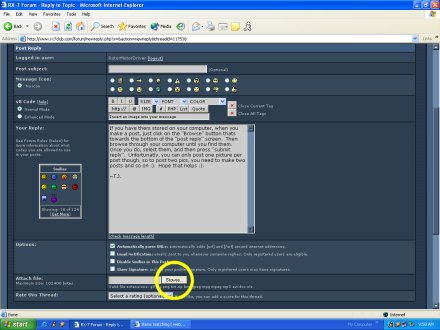
. Hope that helps .~T.J.

Find Racing

Joined: May 2001
Posts: 1,219
Likes: 0
From: Seattle, WA
Originally posted by RotorMotorDriver
If you have them stored on your computer, when you make a post, just click on the "Browse" button thats towards the bottom of the "post reply" screen. Then browse through your computer until you find them. Once you do, select them, and then press "submit reply". Unfortunatly, you can only post one picture per post though, so to post two pics, you need to make two posts and so on. Hope that helps .
~T.J.
If you have them stored on your computer, when you make a post, just click on the "Browse" button thats towards the bottom of the "post reply" screen. Then browse through your computer until you find them. Once you do, select them, and then press "submit reply". Unfortunatly, you can only post one picture per post though, so to post two pics, you need to make two posts and so on
. Hope that helps .~T.J.