


Rtek S4 na rtek 2.0 how to log "load"



S4 na rtek 2.0 how to log "load"
I'm running a 1/2 bridge six port and I've got my fuel trims pretty well where I'd like them to be, and now I'm looking to adjust some timing . The na table reads load vs rpm for the timing map. I know the load is calculated off the airflow, but is there a way to log load directly, or a lookup table to show what loads the different airflow numbers represent


http://www.pocketlogger.com/instruct...cketlogger.pdf
Page 22 and 27 about table indexes and logging.
Load is proportional to airflow divided by rpm. So 100 liters per minute at 2000 revs per minute is higher load than 100 liters at 5000 respectively. I don't think the exact ecu formula for load is known but remember airflow/rpm. Look up Bosch L Jetronic. It's the same thing basically, Denso licensed the technology from Bosch.
It is not TPS based. That is called an Alpha-N control system.
Page 22 and 27 about table indexes and logging.
Load is proportional to airflow divided by rpm. So 100 liters per minute at 2000 revs per minute is higher load than 100 liters at 5000 respectively. I don't think the exact ecu formula for load is known but remember airflow/rpm. Look up Bosch L Jetronic. It's the same thing basically, Denso licensed the technology from Bosch.
It is not TPS based. That is called an Alpha-N control system.

Trending Topics

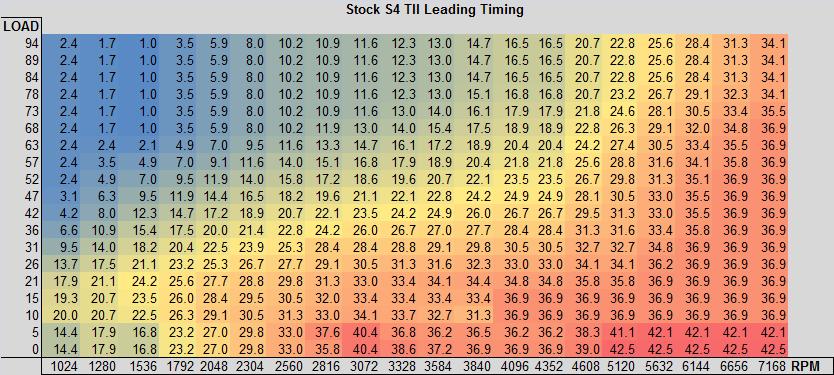
My understanding is that you start at the origin (bottom left) and count to the right for the rpm index and up for the load index. That's your T-Indx parameters.
Last edited by arghx; Mar 1, 2017 at 08:09 AM.
Given the RPM shown on my logger that would make more sense the other way around, "14xx rpm being closest to index 3 and load being 5" but I get what you're saying
