


Power FC microsoft excel chart



microsoft excel chart
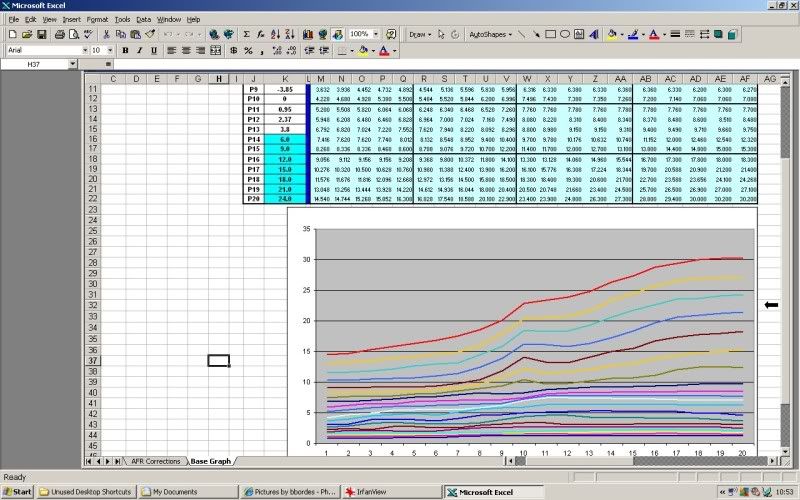
Hey guys I was wondering how is everyones Base map looks on Micrsoft excel chart. I currently have stock twins, stock engine, have all bolt ons with test pipe. When I use the Chart and check out p09 and on using V5.08, it is really smooth with no crossing of lines. I was wondering has anyone experience with good power even if you had to cross the lines in the chart. Or is it ideal for a basemap to be smooth as possible without any crossing.
"Elusive, not deceptive!”

Joined: May 2007
Posts: 930
Likes: 13
From: Slidell, LA
rx74ever,
You should never cross rows but they don't have to be perfectly smooth.
A hump will normally develop from spooling/accelerating vertically through rows.
Also notice that a dip develops you use lean cruise around row 7 and column 7.
Barry
You should never cross rows but they don't have to be perfectly smooth.
A hump will normally develop from spooling/accelerating vertically through rows.
Also notice that a dip develops you use lean cruise around row 7 and column 7.
Barry


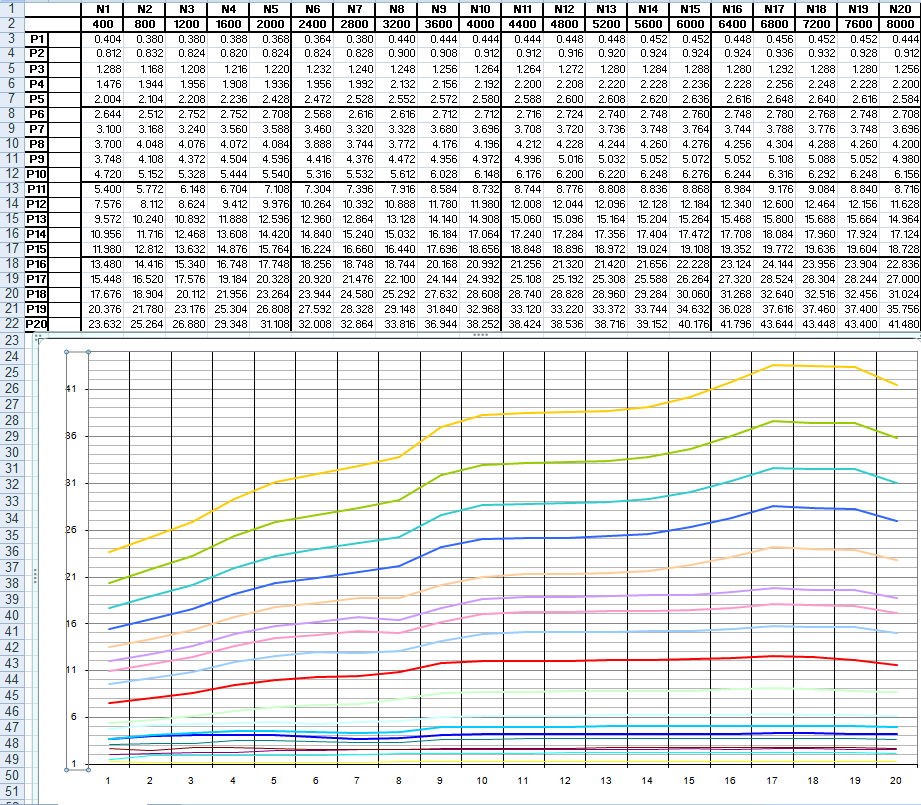

This is for a street ported engine with stock twins, M2 SMIC, M2 air box, stock injectors and RB cat-back.
I prefer to split the curve charts into the lower and upper pressure curves; for me it makes it easier to adjust the points in small increments. These are about the seventh iteration making AFR runs. Subsequent to these data I have removed more fuel from the idle areas with good results.


I prefer to split the curve charts into the lower and upper pressure curves; for me it makes it easier to adjust the points in small increments. These are about the seventh iteration making AFR runs. Subsequent to these data I have removed more fuel from the idle areas with good results.


Trending Topics


There is a patch for Excel 2007 and 2010 to host this feature. Check out the link:
http://blogs.office.com/b/microsoft-...arts-mpoc.aspx
Its not as simply elegant as clicking on a point and dragging but it works better than continuously entering numbers in the tables.
http://blogs.office.com/b/microsoft-...arts-mpoc.aspx
Its not as simply elegant as clicking on a point and dragging but it works better than continuously entering numbers in the tables.
^ I looked into that when I had a trial of 2010 on my new tuning laptop but unfortunately its still too much of a pain. I don't understand why they removed the slide feature, so many people complaining throughout the internets.
thewird
thewird
Nobody knows why the friggin MS ***** removed it. I have Office 2010 and it's a completely new learning experience; not exactly a positive one. In Excel 2003 I would have been considered an expert user but not I'm relegated to amature.

