


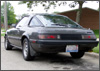
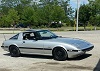
Took some new pics of my car!!


Joined: May 2002
Posts: 5,972
Likes: 37
From: Ottawa, Soviet Canuckistan
Okay, let's cover some possible problems.
1. Are the pics too big? If they're *.bmp, they're too freaking huge. Go to www.download.com and get a trial of Paint Shop Pro.. Use it to convert from *.bmp to *.jpg
2. If they're already JPG, make sure they're small enough to fit in the forum's size limitation. Like 100k or something like that. Use Paint Shop Pro to resize them, try to keep them under 600x600
3. If you're posting from another webspace, make sure that the webserver doesn't mind you linking them from their space. Every time a pic loads there is a call made to the origin webserver, and that takes mega bandwidth. Servers like freeservers, yahoo and the like often don't want you using their photo space to just store things you post elsewhere.
4. Don't post more pics until you're absolutely sure that the other ones worked.
Jon
1. Are the pics too big? If they're *.bmp, they're too freaking huge. Go to www.download.com and get a trial of Paint Shop Pro.. Use it to convert from *.bmp to *.jpg
2. If they're already JPG, make sure they're small enough to fit in the forum's size limitation. Like 100k or something like that. Use Paint Shop Pro to resize them, try to keep them under 600x600
3. If you're posting from another webspace, make sure that the webserver doesn't mind you linking them from their space. Every time a pic loads there is a call made to the origin webserver, and that takes mega bandwidth. Servers like freeservers, yahoo and the like often don't want you using their photo space to just store things you post elsewhere.
4. Don't post more pics until you're absolutely sure that the other ones worked.
Jon


Originally posted by the ascerbic timmya2
i see an idiot
i see an idiot
be nice...you were a noob once, too...

his problem is that he won't ask for help or do a search to find out how to do the deed...

Pride is such a terrible thing...

Last edited by mar3; Jul 26, 2003 at 11:46 AM.



Joined: May 2002
Posts: 5,972
Likes: 37
From: Ottawa, Soviet Canuckistan
Yes, everyone's got that so far.
Your yahoo account has gone over it's bandwidth.
If I were you, I'd find another place to host from, or make them small enough to "attach"
I apologize for the slightly brutal comments of my comrades :P It shouldn't be said that "they were once noobs" but rather that they still ARE noobs, because they haven't yet learned how to deal with people who just don't know the ins-and-outs of posting pictures :P
Jon
Your yahoo account has gone over it's bandwidth.
If I were you, I'd find another place to host from, or make them small enough to "attach"
I apologize for the slightly brutal comments of my comrades :P It shouldn't be said that "they were once noobs" but rather that they still ARE noobs, because they haven't yet learned how to deal with people who just don't know the ins-and-outs of posting pictures :P
Jon


Originally posted by vipernicus42
Your yahoo account has gone over it's bandwidth.
If I were you, I'd find another place to host from, or make them small enough to "attach"
Your yahoo account has gone over it's bandwidth.
If I were you, I'd find another place to host from, or make them small enough to "attach"
Full Member

Joined: Jul 2003
Posts: 96
Likes: 0
From: your moms house
http://wampa.net/more.shtml scroll to the very bottom of the page. Click in the area to the left of the "Browse" button, navigate to the picture on your pc, select the picture, select the "Open" button. Then, back at the site, click the "Upload" button. Wait for it to work it's magic, then it should take you to another screen, with the file you just uploaded on the very top. Click it, and it will open it, select, copy, and paste the link that shows in the browser, come back here, and paste the link. Problem solved. The images will show up as long as my friend doesn't take the site down.
Full Member
Joined: Jul 2003
Posts: 96
Likes: 0
From: your moms house
WARNING: I have noticed that I have to kill my firewall when I want to upload anything to wampa. It's nothing to cry over, just locks my pc up. And if you want it to auto-open here, use the trusty vB code "[ img ] url goes here[ /img ]" like this:

Sorry about the image size, I forgot to re-size it
Sorry about the image size, I forgot to re-size it


Banned. I got OWNED!!!
Joined: Nov 2002
Posts: 1,068
Likes: 0
From: Pensacola
Originally posted by mar3
be nice...you were a noob once, too...
his problem is that he won't ask for help or do a search to find out how to do the deed...
Pride is such a terrible thing...
be nice...you were a noob once, too...
his problem is that he won't ask for help or do a search to find out how to do the deed...
Pride is such a terrible thing...


Prosthetic head.

Joined: Apr 2003
Posts: 1,079
Likes: 0
From: Pennsylvania
Oh, and by the way, to whoever actually started this thread. If you don't like red exes, please click "Post Reply", "browse", find your picture, ensure that it is in JEPG format, and then simply click "Submit Reply".
I am not sure if your problem is more deeply rooted, but all of the replies you got didn't tell you how to simply post the pic.
In short, (not assuming you're dumb) we can't see the pictures still on your harddrive.
I am not sure if your problem is more deeply rooted, but all of the replies you got didn't tell you how to simply post the pic.
In short, (not assuming you're dumb) we can't see the pictures still on your harddrive.
Last edited by excitingleopard; Jul 30, 2003 at 11:15 AM.

Thread
Thread Starter
Forum
Replies
Last Post